Overview
Are you a developer? Do you want to add "PDF Encryption", "PDF Protection", "Add the owner & user password and restrictions of PDF files" feature to your application?
Now, you can try PDF Encrypt ActiveX DLL, with a few function calls, it helps you encrypt pdf in your Win programs or Web applications.
PDF Encrypt ActiveX DLL was intended to protect Adobe Acrobat PDF files, that comes with "owner" and "user" password set, preventing the file from editing (changing), printing, selecting text and graphics (and copying them into the Clipboard), or adding/changing annotations and form fields.
All editions of Adobe Acrobat (including 5.x, 6.x, 7.x, 8.x, 9.x which tools 40-bit,128-bit RC4 & AES, 256-bit AES encryption) are allowed by PDF Encrypt ActiveX DLL.
It is a standalone component and does not depend on Adobe Acrobat, or even Acrobat Reader.
Key Features
- Support Windows NT4, Windows 2000(Server & Professional), Windows XP(Home & Professional), Windows 2003.
- Support Windows VISTA, Windows 7 (32-bit), Windows 2008 R2 (32-bit).
- Password protect opening of the document.
- Password protection for PDF files with 40-bit or 128-bit or 256-bit encryption.
- Support add user password and owner password.
- Support add printing, copying and changing permissions to an encrypted PDF file.
- Support detect whether the PDF file is encrypted.
- Support PDF 1.8 format (Acrobat 9.0 application).
- Royalty free, Use PDF Encrypt ActiveX DLL in your applications without needing to pay any royalty fees for distribution.
- No limits on number of applications.
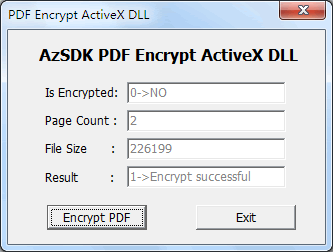
Screenshot
FAQ
- What development languages are supported ?
A: A lot. The DLL component is based on ActiveX, which can be used with VB Script, Java script, Perl, Php, Python, ASP, ASP.Net, VB.Net, C#, VB6, Cold Fusion, Delphi, VC++, Java etc. We have provided examples for all of the above languages. - How do I register the component ?
A: Once you buy the DLL component, The registration code and download link of full version will be sent to you by email. After creating an object instance of ActiveX DLL in your favorite programming languages, calling the SetLicenseKey() method with the code you got by email. In this way, every limitation in trial mode will be removed. - Can you do custom development for special usage?
A: Sure. Please tell us what you need and we can discuss a cost, and then develop custom version on schedule just for you.
Sample code: Encrypt PDF with Delphi, VB, C#, ASP, PHP
» 1. Delphi Sample Code: Encrypt PDF with Delphi
implementation
{$R *.dfm}
procedure TForm1.Button1Click(Sender: TObject);
var
obj: OleVariant;
iRtn, iPermissions: Integer;
sInFile, sOutFile: string;
begin
OpenDialog1.InitialDir := ExtractFilePath(Application.ExeName);
if not OpenDialog1.Execute then
begin
Exit;
end else
begin
sInFile := OpenDialog1.FileName;
sOutFile := ChangeFileExt(sInFile, '') + '_CanNot_Print_Copy_Edit.pdf';
end;
try
obj := CreateOleObject('PDFEncryptX.EncryptLib'); //Create object
except
on E: Exception do
begin
ShowMessage('Please install AzSDK PDF Encrypt ActiveX DLL first.');
Exit;
end;
end;
obj.SetLicenseKey('License Code'); //Set your license key
iRtn := obj.LoadFromFile(sInFile, ''); //Load PDF file
{
iRtn = 1: loaded successful
iRtn = 0: Can not Load
iRtn =-1: File not exist
}
//if load file successful, then get relational property.
if iRtn = 1 then
begin
if obj.IsEncrypted = 1 then //Encrypted PDF ?
edtEncrypted.Text := '1->YES'
else edtEncrypted.Text := '0->NO';
edtPage.Text := IntToStr(obj.PageCount); //Page count of PDF
edtSize.Text := IntToStr(obj.FileSize); //File size of PDF
end;
//Create Permissions: Can not to print, copy and edit.
iPermissions := obj.CreatePermissions(0, 0, 0, 1, 1, 1, 1, 1);
//Call Encrypt method
iRtn := obj.Encrypt(sOutFile, 2, iPermissions, '', '');
case iRtn of
0: edtResult.Text := '0->Encrypt failed';
1: edtResult.Text := '1->Encrypt successful';
2: edtResult.Text := '2->Ignore - file already encrypted';
end;
obj.Close; //Close file
Obj := Unassigned;
end;
procedure TForm1.Button2Click(Sender: TObject);
begin
Close;
end;
end.
» 2. Visual Basic Sample Code: Encrypt PDF with Visual Basic
Private Sub Command1_Click()
Dim obj As Object
Dim iRtn As Long
Dim iPermissions As Long
Set obj = CreateObject("PDFEncryptX.EncryptLib") 'Create object
obj.SetLicenseKey ("License Code") 'Set your license key
iRtn = obj.LoadFromFile(".\PDFEncryptX.pdf", "") 'Load PDF file
'iRtn = 1: loaded successful
'iRtn = 0: Load Failed;
'iRtn = -1: File not exist
'if load file successful, then get relational property.
If iRtn = 1 Then
If obj.IsEncrypted = 1 Then 'Encrypted PDF ?
Text1.Text = "YES"
Else
Text1.Text = "NO"
End If
Text2.Text = obj.PageCount 'Page count of PDF
Text3.Text = obj.FileSize 'File size of PDF
End If
'Create Permissions: Can not to print, copy and edit.
iPermissions = obj.CreatePermissions(0, 0, 0, 1, 1, 1, 1, 1)
'Call encrypt method
iRtn = obj.Encrypt(".\PDFEncryptX_CanNot_Print_Copy_Edit.pdf", 2, iPermissions, "", "")
If iRtn = 0 Then
Text4.Text = "0->Encrypt failed"
ElseIf iRtn = 1 Then
Text4.Text = "1->Encrypt successful"
ElseIf iRtn = 2 Then
Text4.Text = "2->Ignore - file already encrypted"
End If
obj.Close 'Close file
Set obj = Nothing
End Sub
» 3. C# Sample Code: Encrypt PDF with C# (C-Sharp)
using System;
using System.Collections.Generic;
using System.ComponentModel;
using System.Data;
using System.Drawing;
using System.Linq;
using System.Text;
using System.Windows.Forms;
using PDFEncryptX;
namespace Application1
{
public partial class Form1 : Form
{
public Form1()
{
InitializeComponent();
}
private void button1_Click(object sender, EventArgs e)
{
EncryptLibClass obj = new PDFEncryptX.EncryptLibClass();
obj.SetLicenseKey("License Code");
int iRtn = obj.LoadFromFile(".\\PDFEncryptX.pdf", "");
if (iRtn == 1)
{
if (obj.IsEncrypted == 1)
{
textBox1.Text = "YES";
}
else
{
textBox1.Text = "NO";
}
textBox2.Text = obj.PageCount.ToString();
textBox3.Text = obj.FileSize.ToString();
}
//Create Permissions: Can not to print, copy and edit.
int iPermissions = obj.CreatePermissions(0, 0, 0, 1, 1, 1, 1, 1);
//Call encrypt method
int iValue = obj.Encrypt(".\\PDFEncryptX_CanNot_Print_Copy_Edit.pdf", 2, iPermissions, "", "");
switch(iValue)
{
case 0: textBox4.Text = "0->Encrypt failed"; break;
case 1: textBox4.Text = "1->Encrypt successful"; break;
case 2: textBox4.Text = "2->Ignore - file already encrypted"; break;
}
}
private void button2_Click(object sender, EventArgs e)
{
Close();
}
}
}
» 4. ASP Sample Code: Encrypt PDF with ASP
<%
Dim obj
path = server.MapPath(".")
Set obj = CreateObject("PDFEncryptX.EncryptLib")
iRtn = obj.LoadFromFile("..\PDFEncryptX.pdf", "")
obj.SetLicenseKey "Your code here"
'Create Permissions: Can not to print, copy and edit.
iPermissions = obj.CreatePermission(0, 0, 0, 1, 1, 1, 1, 1)
'Call Encrypt() method
iRtn = obj.Encrypt("..\PDFEncryptX_CanNot_Print_Copy_Edit.pdf", 2, iPermissions, "owner", "user")
Response.Write "Encrypt() Return code:" & CLng(iRtn)
set obj = Nothing
%>
» 5. PHP Sample Code: Encrypt PDF with PHP
SetLicenseKey("License Code"); //Set your license key
if ( 1 == $obj->LoadFromFile("../PDFEncryptX.pdf", "") ) //Load PDF file
{
//Create Permissions: Can not to print, copy and edit.
iPermissions = $obj->CreatePermission(0, 0, 0, 1, 1, 1, 1, 1)
//Call encrypt() method
if ( 1 == $obj->Encrypt("../PDFEncryptX_CanNot_Print_Copy_Edit.pdf", 2, iPermissions, "", "") )
{
echo "Encrypt successful." ;
}
$obj->Close(); //Close file
}
$obj = null;
?>