
Overview
Are you a developer? Do you want to add the "PDF Split", "PDF Merge", "PDF extract pages or PDF combine pages" feature to your application?
Now, you can try PDF Split Merge ActiveX DLL, with a few function calls, it helps you split and merge pdf in your Win programs or Web applications.
AzSDK PDF Split Merge ActiveX DLL can be used to split files by pages, you can split the file into single pages or save every a few pages as a new file, it also can be used to merge multiple PDF files or selected pages from one or more files into a PDF file, preservation of original links, and form fields. It also can easily use the rotate function to rotate the pdf page to 90°, 180°, or 270° degrees.
It is a standalone component and does not depend on Adobe Acrobat, or even Acrobat Reader.
Key Features
- Split PDF files into multiple files by the range specified.
- Merge multiple PDF files into one PDF.
- Rotate PDF pages to 90°, 180°, or 270° degrees.
- Standalone, doesn't depend on Adobe Acrobat or Reader.
- Support many development languages, such as VB Script, Javascript, Perl, Php, Python, ASP, ASP.Net, VB.Net, C#, VB6, Cold Fusion, Delphi, VC++, Java, etc.
- More demos in other languages on request.
- Support Windows XP/VISTA/7/8/10/11 and Windows Server 2003/2008/2012/2016(Include R2).
- Support Windows 32-Bit and Win 64-Bit.
- Royalty-free, Use PDF Split-Merge ActiveX DLL in your applications without needing to pay any royalty fees for distribution.
- No limits on the number of applications.
ISplitMergeLib Interface Reference
LONG Split(String inputPdf, String Password, String SplitRanges, String outputPdf)
Description:
Split pdf into several PDF files by page range.
Parameters:
inputPdf: The pdf to be split
Password: password for opening the pdf. If no password, just pass a empty string "".
splitRanges: Ranges is defined by page ranges. Each range of pages will be split into a new output pdf. Ranges are separate by character ",". For example, "1,1,1", will generate three pdfs which contains the first page of the inputPdf. "1-2,2,3,4,1-4,3-4", the fifth output pdf will be made up of the 1, 2, 3, 4 page of inputPdf.
outputPdf: output pdf is named with numbers. The name could be "output%d".pdf or "%d.pdf", the component will automatically replace the "%d" with the number of output pdf file in those strings.
Return Value:
0: Split was failed.
1: Split was successful.
-1: Split Ranges have error.
-2: Source pdf file does not exist.
-3: Destination directory does not exist.
-4: The source pdf file could not be read or processed.
LONG Merge(String inputPdfs, String outputPdf)
Description:
Merge several pdf files into a big pdf file.
Parameters:
inputPdfs: the pdfs to be merged. The files are separated by character "|". For each file, a range can be specified too. For example, "1.pdf|2.pdf" can be used to merge the two pdf files. "1.pdf?1-2|2.pdf?3-4" can be used to merge the 1-2 and 3-4 page of the 1.pdf and 2.pdf.
outputPdf: the output pdf file
Return Value:
0: merge was failed.
1: merge was successful.
-1: Source file list is empty.
-2: An error occurred during the merger.
-3: Destination directory does not exist.
-4: The source pdf file could not be read or processed.
LONG Rotate(String inputPdf, String Password, String rotateRanges, Integer rotateDegrees, String outputPdf)
Description:
Rotate PDF files by page range.
Parameters:
inputPdfs: The pdf to be rotate.
Password: password for opening the pdf. If no password, just pass a empty string "".
rotateRanges: Ranges is defined by page ranges. Each range of pages will be rotating.
Ranges are separate by character ",". For example, "1, 3-4, 8", the output pdf will be rotated of the 1, 3, 4, 8 page of inputPdf. If need rotate all pages, just pass a empty string "".
rotateDegrees: The number of degrees to rotate the page by. Must be a multiple of 90 degrees (90, 180, -90). -90 is equal to 270.
outputPdf: the output pdf file.
Return Value:
0: Rotating was failed.
1: Rotating was successful.
-1: Rotating Ranges have error.
-2: Source pdf file does not exist.
-3: Destination directory does not exist.
-4: The source pdf file could not be read or processed.
-5: Rotate Degrees have error.
LONG GetPageCount(String pdfFile, String password)
Description:
Get the page count of a pdf file
Parameters:
pdfFile: the pdf file
password: password for opening the pdf. If no password, just pass a empty string "".
Return Value:
-1: The pdf file does not exist.
-2: The pdf file could not be analysed.
>0 (Greater than zero): Number of pages of pdf document.
VOID SetLicenseKey(String LicenseKey)
Description:
Set valid license key to unlock ActiveX DLL.
Parameters:
LicenseKey: License Key of registered.
NOTE: This method must be placed in front of Split() and Merge().
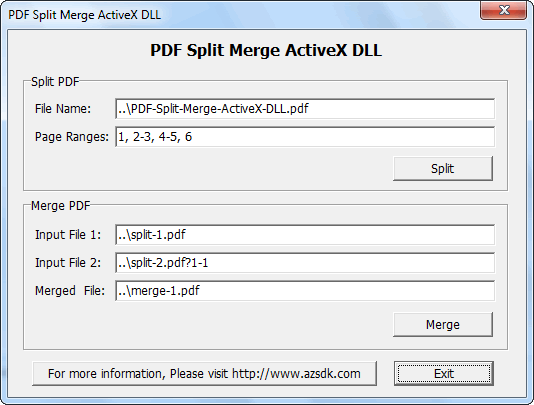
Screenshot of DEMO Program
System Requirements
Desktop
- Windows XP (32-bit, 64-bit)
- Windows Vista (32-bit, 64-bit)
- Windows 7 (32-bit, 64-bit)
- Windows 8/8.1 (32-bit, 64-bit)
- Windows 10 (32-bit, 64-bit)
Server
- Windows Server 2003 (32-bit, 64-bit)
- Windows Server 2008 (32-bit, 64-bit)
- Windows Server 2012 (32-bit, 64-bit)
- Windows Server 2016 (32-bit, 64-bit)